Master the Multiple Choice Quiz: Build High-Converting Quizzes Fast
Learn to craft a high-converting multiple choice quiz from start to finish with expert tips on design, scoring, and workflows that turn visitors into customers.

A well-designed multiple choice quiz isn't just a fun gimmick. It's a strategic lead generation machine. These interactive tools consistently pull in lead conversion rates of 40–55%, turning passive website visitors into genuinely interested prospects.
How? It’s simple. Quizzes offer immediate, personalised value in exchange for an email address, blowing traditional lead magnets like eBooks completely out of the water.
Why a Quiz Is a Powerful Lead Generation Tool
Traditional lead magnets are starting to feel a bit stale. A downloadable whitepaper or a webinar sign-up asks your visitor to commit time and effort for a payoff they might get later. It feels like a one-sided transaction, and people are tired of it.
A multiple choice quiz completely flips that script.
Instead of asking for something, a quiz gives something first: an engaging, interactive experience. It plays on our natural curiosity about ourselves and our hunger for personalised insights. This simple psychological shift makes people far more likely to engage, finish, and ultimately, hand over their email.

Capturing Valuable Zero-Party Data
This is where it gets really interesting. Every answer a user clicks is a piece of zero-party data—information they are willingly and actively sharing with you. This is the absolute best data you can get because it's coming straight from the source.
Consider the difference:
- eBook Download: You know someone is interested in a broad topic. That's it.
- Quiz Completion: You know their biggest challenge, their budget, their timeline, and what they’re trying to achieve.
That level of insight is a game-changer for your sales and marketing. Instead of blasting out generic follow-up emails, you can deliver hyper-relevant content, tailored offers, and sales calls that speak directly to their specific quiz answers. This precision is exactly why interactive content is so effective for people figuring out how to generate more leads and qualify them properly.
Boosting Engagement and Conversions
The very nature of a quiz changes how people behave on your site. It turns a passive scroll into an active conversation. This isn't just good for vanity metrics like "time on site" (which is a nice little SEO bonus). It actually builds a real connection with your brand before you ever ask for anything.
The numbers don't lie. A 2023 study showed that interactive content, quizzes included, hit an average lead conversion rate of 42% on company websites. Compare that to the dismal 12% average for a standard landing page. It's not even close. The research makes it clear: quizzes are brilliant at capturing user preferences, which lets sales teams segment and prioritise leads with way more accuracy. You can read the full research about quiz conversion rates if you want to dig into the details.
A quiz isn’t just a form; it’s a diagnostic tool disguised as a conversation. It qualifies leads on autopilot by getting prospects to tell you exactly what they need and how ready they are to buy.
Let's examine the performance of a quiz funnel versus a traditional one. One relies on a static offer, while the other creates a dynamic, personalised journey.
Quiz Funnel vs Traditional Funnel Performance
| Metric | Multiple Choice Quiz Funnel | Traditional Content Funnel |
|---|---|---|
| Lead Conversion Rate | Typically 40-55% | Typically 2-12% |
| Lead Quality | High (segmented by intent) | Variable (broad interest) |
| Data Captured | Zero-party data (pain points, goals) | Basic contact info (name, email) |
| User Engagement | High (interactive participation) | Low (passive consumption) |
The verdict is pretty clear. A multiple choice quiz funnel doesn't just get you more leads; it gets you better leads. It’s a powerful engine for building a reliable pipeline, making it a non-negotiable tool for any serious marketing strategy.
Crafting Questions That Reveal Customer Intent
The real magic of a high-converting multiple choice quiz isn't just the flashy interaction; it's the intel you gather with every single click. A great quiz does more than just entertain—it systematically qualifies leads by digging into their biggest challenges, their goals, and their intent to buy. Done right, your quiz stops being a toy and becomes a powerful diagnostic tool.
The trick is to ditch the generic, trivia-style questions and design a real narrative journey. Your questions should feel like a natural conversation, guiding someone from a fuzzy idea of their problem to a crystal-clear understanding of how you can solve it.
Start Broad, Then Narrow Your Focus
Your first couple of questions have one job: get the user hooked. They need to be easy, engaging, and completely non-threatening. Think of them as the low-friction entry point to the experience. These initial questions should centre on the user's high-level goals or who they are.
For instance, a marketing software company could kick things off with:
- Question: "What’s your number one marketing goal this quarter?"
- Answers:
- A) "Get more qualified leads in the door."
- B) "Boost our brand awareness."
- C) "Keep the customers we already have."
This question is simple, super relevant, and immediately starts segmenting the audience by their core mission. It's not asking for sensitive info or requiring a ten-minute brainstorm, which means more people will actually answer it.
From that gentle start, you can slowly pivot to more specific questions that poke at their actual pain points. This flow makes the whole thing feel like a helpful chat, not a police interrogation.
Differentiate Between Problem-Aware and Solution-Aware Users
One of the biggest mistakes is treating every quiz taker as if they're in the same headspace. They're not. Your audience is on a spectrum. Some barely know they have a problem, while others are one click away from buying a solution. Your questions have to figure out where they are on that journey.
- Problem-Aware Questions: These are for people who feel the pain but haven't started looking for a cure yet. The questions should help them put a name to their frustrations.
- Solution-Aware Questions: These are for the folks actively Googling solutions and comparing their options. The questions need to get into the nitty-gritty of their needs and what’s stopping them from pulling the trigger.
Imagine a project management tool. Here’s how this plays out in practice:
| Question Type | Example Question & Answers | What You Learn |
|---|---|---|
| Problem-Aware | "What's the biggest source of friction in your team's workflow?" - A) "We're constantly missing deadlines." - B) "Communication between team members is a mess." - C) "Nobody knows who's working on what." | This pinpoints their primary pain. You know exactly what fire they're trying to put out. |
| Solution-Aware | "Which feature is a 'must-have' in your next project management tool?" - A) "Advanced reporting and analytics." - B) "Integrations with our current software." - C) "Something my team will actually find easy to use." | This reveals their buying criteria. You understand what they value most, making your follow-up insanely relevant. |
By asking both types of questions, you get a much clearer picture. The "problem-aware" lead probably needs some nurturing content—a solid blog post or a case study. But that "solution-aware" lead? They're a hot prospect. You could route them straight to a product demo or a sales call.
Design Answer Choices That Expose Nuance
The real genius of a diagnostic quiz is hidden in the answer choices. Forget simple "Yes/No" options. Each choice should represent a distinct persona, a specific challenge, or a different level of sophistication. This is how you uncover the subtle but critical differences between your prospects.
The goal of each question isn't just to get an answer; it's to get a signal. Well-crafted answer options turn a user's click into a clear indication of their budget, urgency, and fit for your product.
Think about a financial advisor creating a "Retirement Readiness" quiz. Instead of asking a blunt and invasive question like "How much have you saved?", they could frame it this way:
Question: "Which statement best describes your current approach to retirement savings?"
- A) "I haven't started yet, but I know I need to." (Signals a beginner who needs foundational education).
- B) "I contribute to my company's plan but don't have a personal strategy." (Signals an intermediate user who is ready for strategic advice).
- C) "I have a detailed plan and am looking for ways to optimise my portfolio." (Signals an advanced user—a prime client for high-value services).
Each answer lights up a clear path for what comes next. Answer A gets an email sequence on "How to Start Saving." Answer C gets a personal invitation for a free portfolio review.
This kind of psychological insight is exactly what makes quizzes like the attachment style quiz so popular; they use nuanced questions to help people understand themselves better. You can see how this works by taking a look at how to build an attachment style quiz and mapping its questions to specific outcomes.
Ultimately, every question and every answer in your quiz must do two jobs at once: provide genuine value to the user and gather actionable intelligence for your business.
Building Your Scoring and Segmentation Logic
Now that you've crafted killer questions designed to uncover what your audience really wants, it's time to build the engine that makes your multiple choice quiz a lead-gen machine.
This is all about the scoring and segmentation logic. It’s the behind-the-scenes magic that translates a user's clicks into a meaningful result and tells your marketing and sales teams exactly what to do next.
A lot of people start with a simple point system. You know the drill: each answer gets 1, 2, or 3 points, and the total score spits out a result. That’s fine for a basic knowledge check, but we're here to qualify leads, not just entertain them.
For a diagnostic quiz, you need something smarter: a weighted scoring model. This is where you get strategic, assigning more points to answers that signal high purchase intent or a perfect customer fit.
Designing a Weighted Scoring Model
In a weighted model, not all answers are created equal. An answer signalling a burning, high-priority problem should carry way more weight than one from someone just kicking tyres.
For a practical example, a marketing automation company could structure their scoring like this:
- Question: "What's your biggest marketing challenge right now?"
- "Generating enough leads." (+1 point - A common, top-of-funnel problem)
- "Nurturing leads effectively through our funnel." (+3 points - More specific, shows they understand the process)
- "Proving the ROI of my marketing efforts." (+5 points - Bingo. This is an advanced, high-intent problem your tool solves)
See the difference? The final score now reflects the lead's quality and urgency, not just how many questions they answered.
Deciding which questions should carry the most weight can be tricky. This decision guide can help you think through whether you're trying to understand a user's problem or their desired solution.
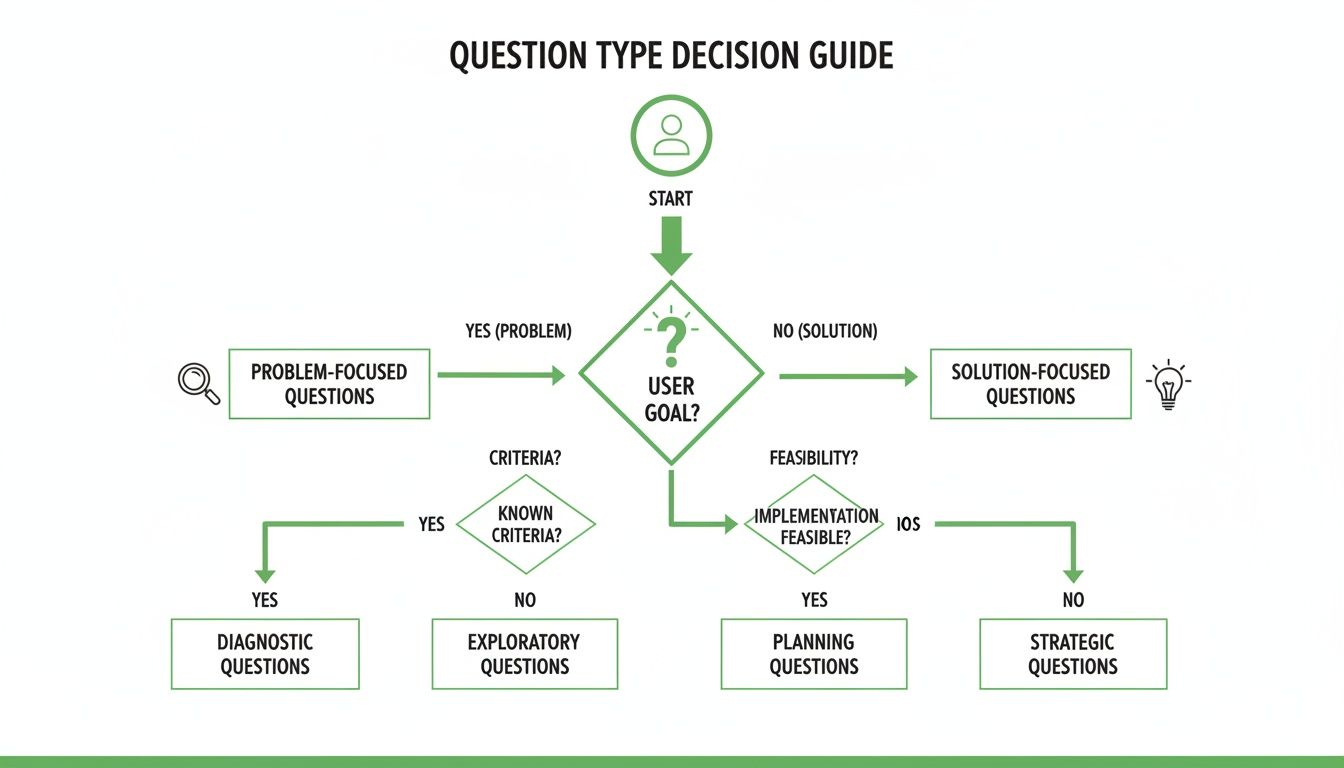
As the chart shows, problem-focused questions should dig into pain points, while solution-focused questions need to explore their specific needs and timeline.
From Scores to Segments
Scoring is only half the job. The real payoff comes when you connect those scores to distinct audience segments—often called 'buckets' or 'outcomes'. This is where you group score ranges into categories that trigger a specific follow-up.
Your segmentation buckets shouldn't just be arbitrary labels. Each one must represent a specific type of lead with a unique set of needs, dictating a precise, automated follow-up action.
Back to our marketing automation quiz example. You might create three core segments:
- 0-10 Points: The Learner: This person is just starting out. They’re researching and learning but are miles away from a sales call.
- 11-20 Points: The Evaluator: This user gets their problem and is actively hunting for solutions. They're a prime candidate for more detailed product info.
- 21+ Points: The Buyer: This is a hot lead. Their answers show a pressing need and a great fit for your product. Sales needs to talk to them, like, yesterday.
Mapping Segments to Automated Follow-Ups
With your segments defined, you can build an automated workflow that gives every single person a perfectly tailored experience. No more generic "thanks for taking the quiz" emails.
Here’s how that might look in practice:
The Learner (Low Score):
- Immediate Action: Send them to a results page with a downloadable guide or a link to an educational webinar. Give value, no strings attached.
- Nurture Sequence: Add them to an email list that drips out helpful blog posts and case studies. Build trust and stay top-of-mind.
The Evaluator (Mid-Range Score):
- Immediate Action: Show them a results page that highlights specific features relevant to their answers. Connect their pain to your solution.
- Nurture Sequence: Follow up with a customer testimonial or an invite to a product demo webinar.
The Buyer (High Score):
- Immediate Action: Don't mess around. Redirect them straight to a calendar to book a demo with sales.
- Nurture Sequence: Immediately ping your sales team with the lead's details and quiz responses. Have a rep send a personal email that references their quiz results.
This kind of logical mapping turns your quiz from a simple piece of content into a slick lead qualification and routing system. It ensures your sales team wastes zero time on lukewarm leads, while your marketing automation warms up everyone else. It's how you build a pipeline that actually works.
And if you're struggling to come up with compelling lead magnet ideas for each segment, the free Magnethive lead magnet audit tool can generate a report with AI-powered suggestions to help tighten up your strategy.
100% Free Lead Magnet Audit
Our AI analyzes your website and delivers custom growth strategies in seconds.
Designing a User Experience That Maximises Completions
You can have the most brilliant questions and segmentation logic in the world, but if the user experience (UX) is clunky, people will bail. Simple as that.
Getting your multiple choice quiz completion rates into the 80-90% range isn't an accident. It’s the direct result of thoughtful design that ruthlessly removes every possible point of friction.
A killer UX starts the moment someone lands on your quiz. It needs a compelling, benefit-driven headline that instantly answers their first unspoken question: "What's in it for me?"
Forget boring, generic titles like "Company Quiz." Instead, promise a tangible outcome. A headline like "Discover Your Marketing Blind Spot in 2 Minutes" or "What's Your Team's Real Productivity Score?" immediately signals value.
This initial hook sets the tone, guiding the user from one question to the next without them ever feeling lost, bored, or overwhelmed.
Creating a Frictionless and Mobile-First Design
Your quiz has to work flawlessly on a mobile device. Period. A huge chunk of your audience will be taking it on their phones, and any pinching, zooming, or awkward scrolling is a guaranteed way to lose them.
Think big, easily tappable buttons for answers. Ensure the layout is clean, simple, and completely uncluttered.
To keep people moving forward, visual progress indicators are absolutely non-negotiable.
- Progress Bars: A simple bar at the top of the screen fills up with each answer. This provides a powerful psychological nudge, showing users how far they've come and how close they are to the finish line.
- Question Counters: Something as basic as "Question 3 of 8" manages expectations and prevents quiz fatigue. It makes the whole thing feel finite and achievable.
This obsession with a clean, responsive design is critical. Even simple trivia quizzes prove the power of good UX. Data shows that mobile completion rates for well-designed quizzes can hit 79%, just by making the interface smooth and intuitive.
Optimising the Lead Capture and Results Page
One of the biggest debates is where to put the lead capture form. If you want maximum lead generation, the answer is crystal clear: gate the results.
Ask for their name and email right before you reveal their personalised outcome. At this exact moment, their motivation is at its absolute peak. They've invested their time and are desperate for the payoff.
Your results page is not just an endpoint; it's the beginning of a new relationship. It must deliver immediate, tangible value that validates the user's decision to share their contact information.
Once they've opted in, the results page needs to deliver the goods. A generic "Thanks!" is a massive letdown and a wasted opportunity.
A high-value results page should do three things, fast:
- Deliver a Clear Outcome: Instantly show them their result or "type" in a bold, easy-to-read format. No ambiguity.
- Provide a Detailed Explanation: Explain what their result means in a few short paragraphs. This is where you flex your expertise and start building trust.
- Present a Tailored Call-to-Action (CTA): This is the money-maker. The CTA must be directly linked to their specific quiz outcome. If their result is "Beginner," offer them an introductory guide. If they're an "Expert," invite them to book a strategy call.
This approach transforms your quiz from a simple form into a valuable diagnostic tool. The principles that make this work are the same ones that apply to any high-performing landing page. For a deeper dive, check out our guide on creating a best practice landing page that actually converts.
By designing a seamless user journey from the first click to the final CTA, you create an experience that not only captures leads but also leaves them feeling understood and genuinely helped.
Connecting Your Quiz to Your Marketing and Sales Tech
A brilliant multiple choice quiz is only half the battle. Seriously.
If the goldmine of data it captures just sits in a spreadsheet, you're leaving a massive opportunity on the table. The real power kicks in when you connect your quiz directly to your marketing and sales tech, creating an automated machine that qualifies and nurtures leads while you sleep.
This connection turns your quiz from a one-off piece of content into the central nervous system of your entire lead generation strategy. It makes sure the right lead gets the right message at exactly the right time, with zero manual work.
Choosing Your Implementation Method
Let's examine how you can get your quiz live and plugged into your systems. Your choice really comes down to your technical comfort zone, your budget, and how complex your segmentation logic needs to be. There are a few well-trodden paths.
Dedicated Quiz-Building Software: This is the fastest and most popular route. Tools like Typeform, Jotform, or other specialised quiz builders are designed for this exact job. They give you friendly interfaces, ready-made templates, and—most importantly—native integrations with all the major CRMs and email platforms.
WordPress Plugins: If your site is built on WordPress, plugins like Thrive Quiz Builder or Formidable Forms offer a great mix of customisation and ease of use. They live right inside your website, which gives you more control over the look and feel while still offering solid integration options.
Custom Code Embeds: For those with developers on hand, building a custom quiz or embedding a coded solution offers total flexibility. This path lets you design a completely unique user experience and build custom integrations with any system via APIs. Just be aware, it requires a much bigger investment in time and technical skill.
The end goal is to pick a method that creates a seamless flow of data. You want quiz responses and lead info to automatically show up in the right fields in your CRM without anyone having to lift a finger.
Setting Up Post-Quiz Automation Workflows
Once your quiz is talking to your tech stack, you can build the automation that brings your segmentation strategy to life. This is where you set up rules that tag leads based on their quiz outcomes and kick off personalised email sequences.
Imagine a user finishes your quiz and gets segmented as a "High-Intent Buyer." Your automation platform should instantly do a few things:
- Create a New Contact: A new lead record pops up in your CRM or email marketing software.
- Apply a Specific Tag: The contact gets tagged with "Quiz Outcome - High Intent" and maybe another tag based on their answers, like "Challenge - Lead Nurturing."
- Trigger a Targeted Nurture Sequence: The lead is immediately dropped into an email workflow built just for high-intent prospects. The first email might invite them to book a demo.
- Notify the Sales Team: An alert gets pinged to the right salesperson with the new lead's details and their full quiz answers, giving them a ton of context for their first call.
This is the kind of automation you need to actually scale your lead gen. To get a deeper look at how these systems fit together, you can explore the relationship between marketing automation and CRM.
Your quiz isn't just capturing an email address; it's capturing intent. The job of your tech stack is to immediately act on that intent, creating a personalised journey that guides the prospect from curiosity to conversion.
Practical Example: An Email Nurture Sequence
Suppose your quiz sorts people into three buckets: "Beginner," "Intermediate," and "Expert." Your first follow-up emails should be drastically different for each one.
Email for the "Beginner":
- Subject: Your Personalised Guide to Getting Started
- Body: Thanks for taking the quiz! Based on your answers, we've pulled together some of our best resources to help you build a solid foundation. Here's a great place to start...
- CTA: Download our Free Beginner's eBook.
Email for the "Expert":
- Subject: A Strategy to Optimise [Their #1 Challenge]
- Body: Your quiz results show you're already operating at a high level. You mentioned that [Their #1 Challenge] is a key focus. Our team specialises in solving that exact problem for experts like you.
- CTA: Book a 15-Minute Strategy Call.
This automated, personalised follow-up is what transforms a simple quiz into a high-performance lead qualification engine. It makes every single lead feel understood and delivers value that’s directly relevant to their needs, which dramatically increases your chances of conversion.
Common Questions About Building a Better Multiple Choice Quiz
Even with a killer plan, you might hit a few snags building a multiple-choice quiz that actually performs. Let’s walk through the most common questions marketers get stuck on and give you some straight answers.
How Many Questions Should My Quiz Have?
The sweet spot is usually between 7 and 12 questions.
This range is long enough to feel substantial—like you’re delivering real insight—but short enough that people don’t get bored and bounce. It’s a delicate balance. Go with fewer than seven, and asking for an email feels a bit cheeky, like you haven’t earned it. Push past 15, and you’ll watch your completion rates nosedive from user fatigue.
Remember, the goal isn't just a number. Every single question needs to pull its weight, either helping you segment the lead or making their final result more personal and valuable.
Should I Ask for an Email Before or After the Results?
For lead gen? Always gate the results. Ask for their email right before you reveal their personalised outcome.
Think about it. This is the moment of peak curiosity. They’ve invested their time, answered the questions, and are dying to know the answer. You’ve delivered an engaging experience, and now they’re ready for the payoff.
Frame it as a fair trade: “Enter your email to get your personalised results.” If you show the results first, you’ve lost all your leverage. They got what they came for and have zero incentive to hand over their contact details. Your conversion rate will tank. The key is making sure the results page that follows is genuinely insightful, building trust and proving their click was worth it.
What Are the Most Important Metrics to Track?
Counting leads is just the start. To really understand if your quiz is working, you need to be watching a few key performance indicators.
Completion Rate: This is the percentage of people who start the quiz and actually finish it. A well-designed quiz should hit a completion rate of 70% or higher. If it’s lower, your questions might be too hard, too long, or just plain boring.
Lead Conversion Rate: Of the people who finished, how many actually gave you their email? This number tells you how compelling your results promise is. You should be aiming for 40% or more.
Lead-to-SQL Rate: This is the big one. How many leads from the quiz eventually become Sales Qualified Leads? This metric tells you if you're attracting the right crowd and if your segmentation logic is actually spotting the high-intent prospects.
How Do I Promote My Quiz to Get Traffic?
A great quiz is useless if no one sees it. You need to push it across every channel you have available.
Start with your own turf. Feature it on your homepage or in your main navigation with a strong call-to-action. An exit-intent pop-up can also be surprisingly effective for catching visitors before they leave.
Next, hit your social media profiles. Don't just post a link; sell the benefit. What personal insight will they gain? Why should they spend two minutes on it? And for those looking to speed up the creation process from existing content, you can learn how to create quizzes efficiently from existing documents.
Finally, put some budget behind it. Run targeted ad campaigns on platforms like Facebook or LinkedIn, driving traffic to a dedicated quiz landing page. A multi-channel attack like this ensures you’re hitting new audiences and engaging your current followers, which is how you get the numbers up.