Boost Conversions with online quiz on html: A Simple HTML Quiz Builder
Learn how to craft an online quiz on html that engages visitors and boosts conversions with a ready-to-use, step-by-step guide.
An online HTML quiz isn't just a simple test. It's an interactive tool that lets you check someone’s knowledge of HyperText Markup Language. But here’s the clever bit: instead of a boring, static download, it pulls users in with questions, gives them instant feedback on their skills, and in return for that value, you get their contact info. It's one of the sharpest lead-gen assets you can build.
Why an HTML Quiz Is Your Best Lead Magnet
The old-school lead magnets are getting tired. Ebooks and whitepapers still have a role, sure, but they’re passive. Someone downloads a PDF, and it probably sits in their "to read" folder forever. An interactive quiz flips the script entirely. It turns lead gen from a one-way transaction into a genuinely engaging, two-way exchange.
It works because it taps into some basic human psychology. A quiz sparks curiosity—"How good am I really at HTML?"—and it feeds our desire to see where we stack up. This kind of active participation makes the whole experience stickier and more valuable than just skimming a PDF.
From Engagement to Intelligent Segmentation
Here's where it gets really powerful. An HTML quiz doesn't just collect emails; it qualifies and segments your leads for you, automatically. Think about it. By designing questions around different skill levels, you can instantly sort people into buckets without lifting a finger.
The possibilities are huge:
- Beginner Funnel: Someone scores low? They’re clearly a novice. You can drop them straight into an email sequence offering foundational HTML resources, tutorials for beginners, or an intro course. For example, your follow-up email could offer a free guide titled "The 5 HTML Tags Every New Coder Should Know."
- Intermediate Funnel: A user gets a medium score. They're ready for the next step. Send them content on CSS frameworks or JavaScript integration. A practical follow-up could be an invitation to a webinar on "Integrating JavaScript with Your HTML Projects."
- Expert Funnel: Someone nails the quiz with a high score. This is a pro. Send them a deep-dive technical case study, an invite to an advanced webinar, or info on a specialised tool they might actually use. You might send them an advanced article on "Optimizing Web Performance with Semantic HTML5."
You just can't get this level of instant, relevant personalisation from a generic ebook download. It's a different league.
A well-designed quiz doesn't just collect emails; it gathers intelligence. It tells you who your audience is, what they know, and what they need to learn next, allowing for hyper-targeted follow-up that actually converts.
Before we dive deeper, let's just hammer home why this approach leaves traditional lead magnets in the dust.
Interactive Quizzes vs Traditional Lead Magnets
| Feature | Online HTML Quiz | Traditional Ebook/PDF |
|---|---|---|
| User Engagement | High – Active participation and curiosity-driven. | Low – Passive consumption, often saved for later. |
| Value Delivery | Instant – Provides immediate feedback and a score. | Delayed – Requires the user to read and digest. |
| Lead Qualification | Automated – Segments leads by skill level instantly. | Manual – Generic download, no data on expertise. |
| Data Collection | Rich – Gathers insights on user knowledge and gaps. | Basic – Collects only name and email. |
| Personalisation | High – Allows for hyper-targeted follow-up funnels. | Low – Generic follow-up for all leads. |
| Conversion Rates | Generally higher due to interactive nature. | Generally lower due to passive consumption. |
The table makes it pretty clear. One is a dynamic data-gathering tool, and the other is a digital pamphlet.
Proven Effectiveness in Professional Settings
This isn't just a marketing gimmick; it's a proven method for skill validation. Just look at the corporate training world. Quizzes are everywhere for assessing knowledge and reinforcing learning. Companies often use online quizzes as part of their onboarding process for technical roles to establish a baseline of employee knowledge. The pros trust this format because it works.
If you want to see how this idea of interactivity is changing the game in other areas, check out this piece on interactive product demos as a sales superpower. And if you're struggling to come up with quiz ideas yourself, a dedicated lead magnet creator can help you brainstorm and structure one.
Feeling like your current lead magnets are underperforming? You can get a clear picture using a free audit tool. For example, Magnethive generates a comprehensive report with AI-powered lead magnet ideas and analysis of your current assets, showing potential ROI impact. It's a natural way to see if an interactive quiz is the right next step for your strategy.
By making the switch to an interactive quiz, you’re not just getting an email address. You’re giving instant value and getting back actionable data—the perfect setup for marketing that actually works.
Crafting Questions That Engage and Segment
The success of your HTML quiz rides entirely on the quality of your questions. Lame, generic questions lead to a boring experience for the user and, worse, useless data for you. The real goal here isn't just to test someone's knowledge; it's to take them on a journey that cleverly sorts them into neat, actionable buckets.
This whole process has to start with your end goal. What are you actually trying to achieve? Are you looking for total beginners who need your introductory course? Or are you hunting for seasoned developers to pitch your advanced SaaS tool? That single objective should dictate every single question you write.
Balancing Difficulty and Motivation
One of the most common traps people fall into is making their quiz either way too hard or ridiculously easy. If it's too difficult, people will get frustrated and just bail. If it’s a cakewalk, it won't feel valuable, and the data you get will be meaningless for segmentation.
You're looking for that sweet spot: a gentle difficulty curve.
Kick things off with an easy, confidence-boosting question. This gets the user invested and feeling good. From there, you can gradually ramp up the complexity to get a real read on their skill level.
- Easy Opener: "What does HTML stand for?" This is a simple recall question that anyone with a passing interest should get. It's a low-friction entry point.
- Intermediate Challenge: Now, ask something that requires a bit more thought, like explaining the difference between a
<div>and a<span>. This separates the curious from those with some hands-on experience. - Advanced Test: Time for a real test. Drop in a code snippet and ask the user to spot a subtle error in a block of HTML5 semantic tags. This is how you find your experts.
This natural progression keeps users engaged while giving you the insights you need to pinpoint their actual expertise.
Structuring Your Scoring for Segmentation
Think of your scoring logic as the engine driving your entire segmentation strategy. This is how you translate simple answers into meaningful audience groups. Don't just slap one point on every correct answer—that’s lazy. Instead, think about what each question reveals about the person answering it.
Let's map out a simple but effective scoring system for a 10-question quiz:
- Questions 1-3 (Easy): Award 5 points each. These just confirm a baseline interest.
- Questions 4-7 (Intermediate): Award 10 points each. These start to separate the novices from people with some practical skills.
- Questions 8-10 (Advanced): Award 15 points each. These are your expert-identifiers.
Using a weighted system like this gives you a final score that paints a much clearer, more nuanced picture of a user's proficiency than a simple 1-10 tally ever could.
A well-crafted scoring system isn’t just about grading a user; it's about decoding their needs. By assigning different weights to questions, you can precisely map their score to a buyer persona, making your follow-up marketing incredibly relevant.
Defining Your Audience Segments
Okay, once your scoring logic is locked in, you can define your segments. This is where the magic really happens. By mapping score ranges to specific personas, you set yourself up for hyper-targeted follow-up that actually resonates.
Here’s a practical example of what score-based personas could look like:
| Score Range | Persona | Description | Potential Follow-Up |
|---|---|---|---|
| 0-40 points | HTML Newcomer | Just starting their journey. Needs foundational knowledge and guidance. | Email sequence with beginner tutorials, links to free resources, and an offer for an introductory course. |
| 41-85 points | Aspiring Developer | Understands the basics but needs to deepen their skills with real-world applications. | Invite to a webinar on CSS frameworks, a case study on responsive design, or a guide to JavaScript basics. |
| 86-100 points | Seasoned Coder | An experienced professional looking for advanced techniques, tools, and efficiency gains. | A technical whitepaper, an invitation for a product demo, or content on advanced API integrations. |
This kind of segmentation turns your quiz from a simple lead magnet into a powerful business intelligence tool. The main goal here is to segment your audience, and exploring different customer segmentation strategies can give you a ton of ideas for refining these personas. For a deeper look at how quiz mechanics can reveal user psychology, our guide on the attachment style quiz has some great lessons you can apply here.
Choosing the Right Question Formats
Nobody likes a monotonous quiz. If you just use multiple-choice for every question, people are going to get bored. Mix it up to keep things interesting and test different kinds of knowledge.
Try blending in a few of these formats:
- Multiple-Choice Questions (MCQs): The classic. They're perfect for testing factual recall. Just make sure your incorrect options (the "distractors") are plausible enough to make it a real test.
- Code Snippet Challenges: Show a block of HTML and ask the user to find an error, predict what it will look like, or choose a better tag. This is fantastic for assessing practical, real-world skills.
- "What's Missing?" Questions: Present some code with a blank space and ask the user to fill it in. This directly tests their grasp of syntax and structure.
- Image-Based Questions: Show a screenshot of a webpage and ask which HTML structure would create that layout. This powerfully connects code to visual outcomes.
By combining these formats, your HTML quiz becomes way more dynamic. More importantly, it gives you a much more rounded assessment of each user's skills, making the lead data you collect richer and far more reliable for your marketing efforts.
Choosing Your Quiz Building Approach
Alright, you've mapped out the questions and figured out the scoring logic for your HTML quiz. Now for the big decision: how are you actually going to build this thing?
You've basically got three paths you can go down. Each comes with its own trade-offs in speed, flexibility, and the amount of tech skill you need. Your choice really boils down to your budget, your timeline, and just how much control you want over the final product.
Let's break them down, from the dead-simple no-code options to rolling up your sleeves and coding it yourself.
The No-Code Route: Quick and Simple
For marketers who need to move fast and don't have a developer on speed dial, no-code quiz builders are a godsend. Platforms like Typeform, Outgrow, or involve.me are built for exactly this. You can get a professional-looking quiz built and launched in a few hours—sometimes even minutes—using a simple drag-and-drop interface.
These tools do all the heavy lifting for you:
- User-Friendly Interfaces: You honestly don't need to write a single line of code. Everything is handled through visual editors.
- Pre-Built Templates: Most of them have a whole library of templates you can tweak to match your brand's look and feel.
- Built-in Integrations: They plug right into popular CRMs and email marketing tools, so you can zap your lead data straight to where it needs to go.
The rise of these platforms has been a game-changer. These modern tools allow users to build and deploy quizzes much faster than traditional coding methods. In education, many teachers and institutions use these platforms for creating online assessments because of their efficiency and user-friendly nature. That efficiency is exactly why they've become so popular. You can even explore more about these examination methods to see the full impact.
The main catch with no-code tools? You're playing in their sandbox. The customisation is usually pretty good, but you'll never have the total creative freedom you get from writing your own code.
Key Takeaway: No-code builders are your best friend for speed and simplicity. If your main goal is to get a functional, good-looking quiz live fast without bugging a developer, this is the way to go.
The Custom Code Approach: Ultimate Control
If you've got the technical chops (or a dev team), building a custom quiz with HTML, CSS, and JavaScript gives you unparalleled flexibility. This path means total control over every pixel, every animation, every function. You're not stuck with a platform's limitations; you can build a truly unique and deeply branded experience.
This approach boils down to three core technologies working together:
- HTML (HyperText Markup Language): This is the skeleton of your quiz. You'll use HTML to structure the questions, the answer options, the buttons, and the final results page.
- CSS (Cascading Style Sheets): This is all about the look and feel. CSS handles the colours, fonts, layout, and making sure your quiz looks sharp on any device, from a phone to a desktop.
- JavaScript: This is the brains of the whole operation. JavaScript manages the logic—tracking answers, calculating the score, and showing the right results based on how the user did.
To pull back the curtain a bit, here's what a super basic HTML structure for one question might look like. It's not as scary as you'd think.
Question 1: What does the <a> tag define?
This little snippet just lays out a question and its possible answers. Your JavaScript code would then "listen" for a click on one of those buttons, check that data-correct attribute, and update the score. It's a simple example, but it shows you the basic idea of building your quiz from the ground up.
100% Free Lead Magnet Audit
Our AI analyzes your website and delivers custom growth strategies in seconds.
Making the Right Choice for Your Project
So, which path should you take? It's really a balancing act between your resources and your goals.
If you're a marketer focused on lead gen and speed is everything, a no-code tool is almost always the right call. The subscription cost is often way less than what you'd pay for a developer's time.
But, if your quiz is a core part of your brand's identity or you need some really specific functionality that no-code builders just don't offer, then a custom build is worth the investment. It lets you create an experience that's perfectly in sync with your brand and your user's journey.
This decision tree visualises how your scoring logic—something we planned earlier—can map directly to user segments. This is the real payoff of any well-built quiz.
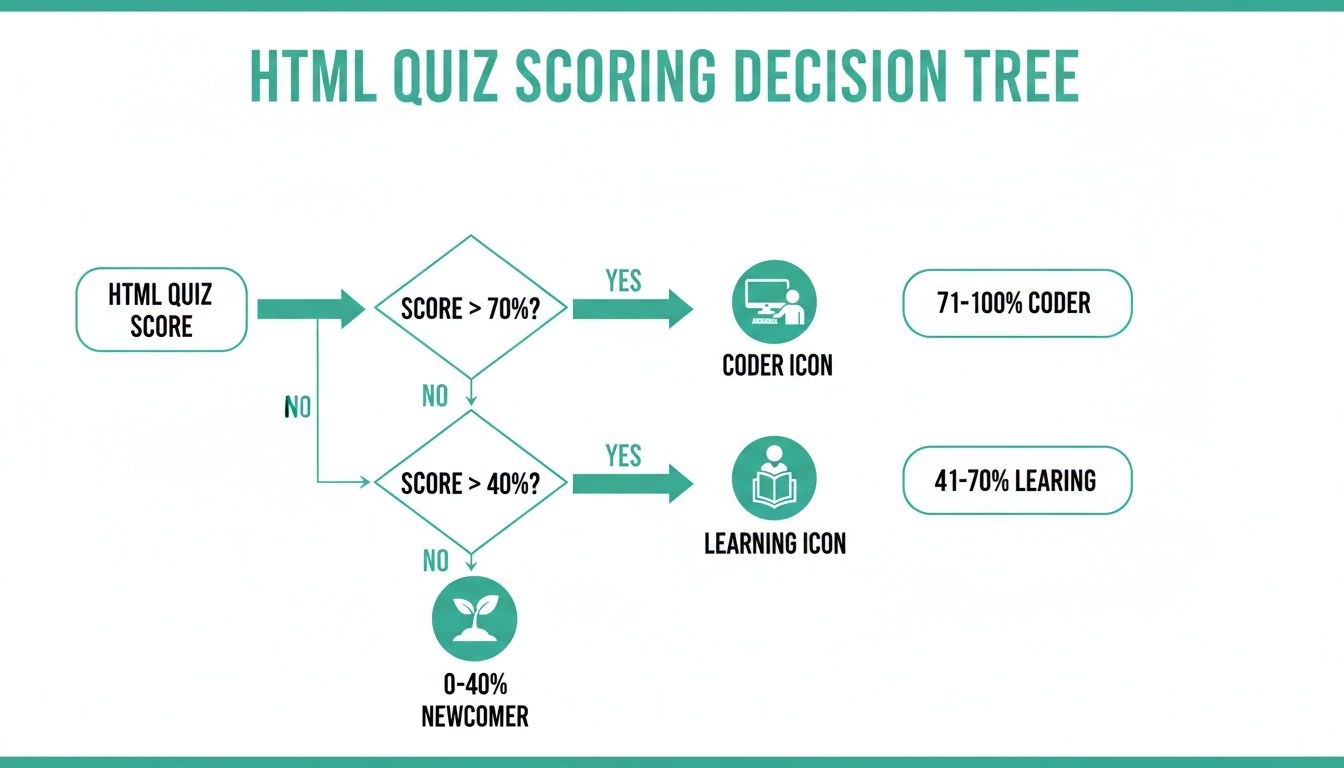
Ultimately, what this chart shows is that the power of a quiz, whether no-code or custom-built, lies in its ability to turn a simple score into an actionable audience segment.
And don't forget there's a middle ground: low-code platforms. These tools offer more customisation than pure no-code builders, letting you inject your own code snippets (like CSS or JavaScript) to tweak their templates. This can be a great compromise if you need a bit more flexibility but don't want to build the whole thing from scratch.
Your choice of tool is foundational. It affects not just the initial build but also how easily you can iterate and improve your quiz down the line. Pick the approach that fits your current resources and your long-term goals.
Designing a High-Converting User Experience
Here's a hard truth: a brilliant quiz with a clunky user experience is a brilliant quiz nobody will finish. You can write the cleverest questions in the world, but if the journey from start to finish is confusing or slow, people will just leave.
The goal is to make the interface completely invisible. Every element—from the landing page that hooks them in to the final results screen—needs to be so intuitive that the user can just focus on answering the questions. Clean design and a responsive layout aren't just nice extras; they're critical for getting people over the finish line.
Crafting a Compelling Quiz Landing Page
The user's journey doesn't start with the first question. It starts the moment they see your quiz landing page. This is your one shot to convince them that your quiz is actually worth their time.
Your headline is everything here. A generic "HTML Quiz" is a snooze-fest. Try something that promises a real benefit, like "How Strong Are Your HTML5 Skills? Find Out in 90 Seconds." This sparks curiosity and tells them exactly how long it'll take.
- Be clear about the payoff: What will they get? A score? Personalised feedback? A list of resources? Spell it out.
- Keep it clean: Use a strong hero image, plenty of white space, and a single, unmissable call-to-action (CTA) button that says something like "Start the Quiz."
- Kill the distractions: Get rid of any extra navigation links or sidebars. The only goal here is to get them to click that start button.
If you really want to nail your landing page, our detailed guide on best practice landing page design has some seriously actionable tips you can use right away.
Prioritising a Mobile-First and Clean Interface
It's 2024. If your quiz doesn't work perfectly on a phone, it might as well not exist. A huge chunk of your traffic will be on mobile, so a responsive design is non-negotiable.
This means big, tappable buttons, fonts you can actually read without squinting, and a layout that doesn't make you want to pinch and zoom.
A progress bar is another small but powerful psychological trick. Seeing "Question 3 of 10" reduces that feeling of "how much longer is this going to take?" and encourages people to stick with it. It breaks a big task down into small, manageable wins.
A frictionless user experience is invisible. When the design works perfectly, users don't notice it; they only notice the value of the quiz itself. Any friction, however small, breaks that immersion and gives them a reason to leave.
The Critical Moment of Lead Capture
This is probably the single most important UX decision you'll make: when do you ask for their email? This one choice can make or break your conversion rates. You really have two main options.
- Email First (Gating the Quiz): Asking for an email right at the start creates a massive barrier. You'll get fewer people starting the quiz, but the ones who do are likely more committed. Think of them as higher-quality leads.
- Email Last (Gating the Results): This is the go-to strategy for a reason. You let people finish the whole quiz, building up their investment and curiosity. By the time they reach the end, they really want to see their score, making the email request feel like a fair trade for the results.
For most lead generation quizzes, gating the results is the way to go. You've already provided value and proven your quiz is legit. A simple "Enter your email to see your HTML score and get custom learning resources" can work wonders here.
If you're not sure if your lead capture strategy is working, an outside perspective can be a game-changer. An audit of your lead magnet can give you an objective analysis and help you squeeze more conversions out of your user journey.
Wiring Your Quiz Into Your Marketing Funnel
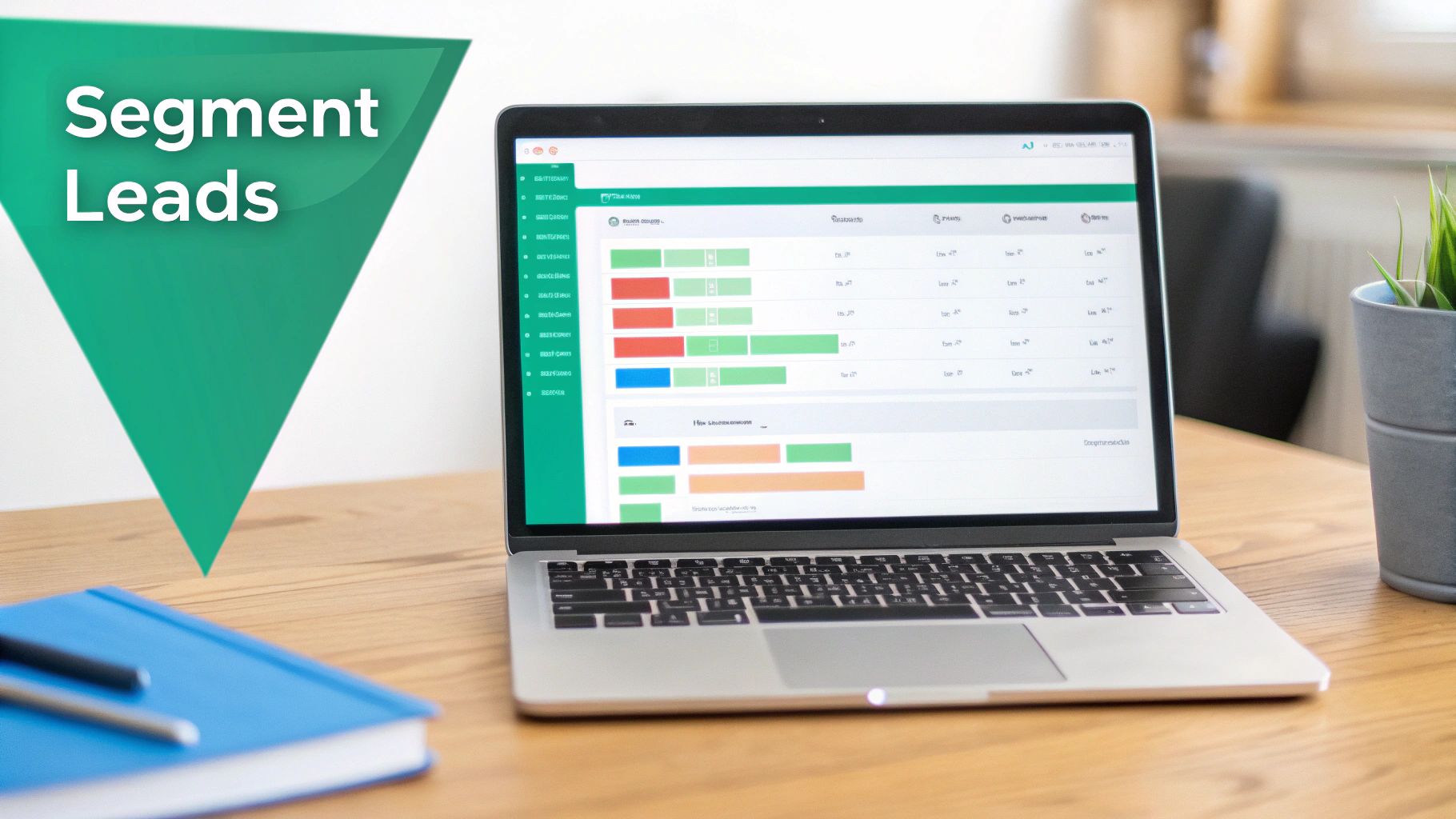
Alright, someone just finished your quiz. You got a lead. Great.
But that’s just the starting whistle. The real money is made in the follow-up. This is where you connect the data dots and turn a momentary interaction into an actual relationship.
Your goal should be to make the journey from quiz completion to the first email absolutely seamless. When a user sees their results, that data should instantly hit your CRM or email platform, kicking off a personalised sequence based on how they performed. No delays. No manual exports.
Connecting the Pipes to Your Marketing Stack
Getting into the plumbing, how you hook everything up depends entirely on how you built the quiz in the first place. Fortunately, each route has a clear path to integrating with the usual suspects like HubSpot, Mailchimp, or ActiveCampaign.
- No-Code Builders (like Typeform or Outgrow): These tools are practically built for this. Most offer native, one-click integrations with major CRMs. You just log in, map the quiz fields (name, email, score, segment) to the right spots in your contact records, and you’re off to the races. It’s usually a five-minute job.
- Custom HTML/JS Quizzes: If you went the DIY route, you have a bit more control. The cleanest method is using a webhook. When the user hits "submit," your JavaScript fires off the data to a special URL provided by your marketing tool. Another solid option is using a service like Zapier or Make to act as the middleman between your form and your CRM.
No matter which path you take, make sure you're passing three critical pieces of data for every single lead: their email, their final score, and the segment you’ve assigned them (e.g., “HTML Newcomer”). That’s the fuel for your automation engine.
Building Email Sequences That Actually Resonate
With the data flowing, the real fun begins. You can now build automated email sequences that speak directly to each person’s skill level. This is the payoff. Sending a generic "thanks for taking the quiz" email is a massive wasted opportunity.
Let's break down what this looks like in practice. Someone just finished your quiz. Here's how you can tailor the entire experience.
Segment 1: The HTML Newcomer (Score 0-40%)
This person is just dipping their toes in the water. They're curious, maybe a little overwhelmed. Your job is to be their friendly guide, not a hardcore sales machine.
- Email 1 (Immediate): "Your HTML Quiz Results & Where to Start." Deliver their score and immediately give them something useful, like a link to a foundational blog post: "The 5 HTML Tags Every Beginner Needs to Know."
- Email 2 (Day 2): "Your Free HTML Cheat Sheet." Offer a downloadable PDF they can pin up next to their monitor. It's practical, valuable, and keeps you top of mind.
- Email 3 (Day 4): "Video: Your First Webpage from Scratch." Switch up the format. Show them a quick win with a simple tutorial.
Segment 2: The Aspiring Developer (Score 41-85%)
This user gets the basics and is hungry for more. They want to move from theory to building real stuff. Your content needs to help them make that jump.
- Email 1 (Immediate): "Nice Work! Here's What to Tackle Next." Send their score and point them to an intermediate-level article on semantic HTML5 or CSS frameworks.
- Email 2 (Day 2): "Case Study: Building a Responsive Portfolio." Show them a real-world application of the skills they're learning. People love seeing how the pieces fit together.
- Email 3 (Day 5): "Invite: Live Webinar on Advanced CSS Selectors." Offer them a chance to learn directly from an expert. It positions you as an authority.
Segment 3: The Seasoned Coder (Score 86-100%)
This is a high-value lead. They're likely a professional looking for advanced techniques, better tools, or ways to work more efficiently. Don’t waste their time with beginner content.
- Email 1 (Immediate): "Impressive Score! Ready for a Deeper Dive?" Acknowledge their expertise. Share a more technical resource, like a whitepaper on web performance optimisation.
- Email 2 (Day 3): "A Tool Built for Pros Like You." If you have a relevant product, now's the time for a soft introduction. Focus on features that solve expert-level headaches.
- Email 3 (Day 7): "Personal Invite for a Quick Demo." For a segment showing this much intent, a direct, personal invitation from your sales or product team can be incredibly effective.
The magic of a quiz funnel is that it lets you start a relevant conversation from the very first touchpoint. By acknowledging where someone is on their journey, you build trust and become a valuable resource, not just another name in their inbox.
This isn't just theory; it's a trend that's reshaping online education. The best online HTML quizzes see high engagement, and online assessment platforms report high average completion rates. This proves that when done right, the format is sticky. You can discover more insights about these HTML assessment trends.
By wiring your quiz directly into your funnel and automating personalised follow-ups, you create a powerful, scalable system for turning curious visitors into highly qualified leads.
Common Questions About HTML Quizzes
As you start piecing together your HTML quiz, a few practical questions are bound to pop up. Nail these details, and you’ll build something that not only grabs attention but actually turns that attention into high-quality leads.
Let's get into the nitty-gritty questions I hear all the time.
How Many Questions Should My HTML Quiz Have?
The goal is to find that sweet spot between being substantial and being snappy. Too short, and it feels like a gimmick. Too long, and people will bail before you get their email.
For a technical topic like HTML, 7-15 questions is the magic number. This gives you enough runway to gauge someone's actual skill level without taking more than a couple of minutes of their time.
A quiz in this range lets you:
- Mix in questions for beginners, intermediate folks, and even a few for the experts.
- Collect enough data to properly segment your new leads.
- Keep the momentum going so people actually finish what they start.
Should I Gate the Quiz Results Behind an Email Form?
For lead generation? Absolutely. In fact, that's the entire point.
Think of it this way: the user's score and the personalised feedback you offer are the "payment" they receive for giving you their contact details. You've provided a valuable, interactive experience, and now you're asking for a fair exchange.
Build up the anticipation as they go through the questions. Then, right after they hit "submit" on the last one, present the email form before showing them the results page. Frame it clearly: "See your HTML score and get personalised learning tips!" It makes the ask feel like a natural and necessary step, not a frustrating barrier.
Your quiz results are the payoff. By positioning them as a valuable, personalized insight, you transform the email request from a barrier into a necessary final step for the user to get their reward.
What Follow-up Content Works Best for Quiz Leads?
This is where your earlier work on segmentation really shines. Sending a generic, one-size-fits-all email to everyone who takes your quiz is a complete waste of the momentum you just built.
Instead, create tailored email sequences based on the segments you defined (e.g., beginner, intermediate, advanced). A beginner who scored low might get a free HTML cheat sheet or a link to a foundational tutorial. An advanced user, on the other hand, would get way more value from a deep-dive case study or an invite to a specialised webinar.
Personalisation is everything here. It's how you turn a simple quiz lead into someone who actually trusts your expertise and wants to hear more from you.