Boost Conversions with the plugin wordpress quiz: A Practical Guide
Discover how to choose and deploy the plugin wordpress quiz to capture qualified leads, segment your audience, and boost conversions.
Forget traditional lead magnets. A plugin wordpress quiz is one of the most powerful tools in a marketer's arsenal, consistently outperforming old-school ebooks with conversion rates that can hit an impressive 40-55%. It's not just about getting an email; it's about starting a conversation.
These interactive experiences are designed to capture incredibly valuable zero-party data and segment your audience on autopilot, all while giving your visitors instant, personalised value.
Why a WordPress Quiz Is Your Strongest Lead Magnet

We live in a world drowning in downloadable PDFs and generic newsletters. A quiz cuts through that noise because it’s a two-way street. Instead of just pushing information out, you’re pulling insights in, making the entire exchange feel personal and genuinely useful. This is how you efficiently generate leads online.
This simple shift turns passive website visitors into active participants. It taps directly into a core human driver: our curiosity to learn about ourselves. When someone takes your quiz, they aren't just consuming content. They're on a mini-journey of self-discovery, which makes them far more invested in seeing the outcome.
The Power of Zero-Party Data
Think about what a traditional lead magnet, like an ebook, really tells you. All you know is that a prospect was interested enough in a topic to trade their email for a file. That's it.
A well-designed quiz, on the other hand, gathers zero-party data—information a person intentionally and proactively shares. This is the absolute gold standard of customer data.
For example, a marketing agency could run a "What's Your Biggest Marketing Bottleneck?" quiz. The answers instantly reveal a lead's most urgent pain points:
- Are they struggling just to get leads in the door?
- Is their real problem converting the leads they already have?
- Or do they completely lack a coherent content strategy?
This kind of insight lets you create hyper-targeted follow-ups. Forget the generic "welcome to our newsletter" email. You can send resources that specifically address their stated challenge, which dramatically boosts relevance and the odds of conversion.
Turning Engagement into Automatic Segmentation
Here's where a WordPress quiz plugin really shines: it automates your audience segmentation. Every answer a user gives can be tagged and scored behind the scenes. By the time they hit "submit," you don't just have another email address. You have a detailed, pre-segmented lead profile.
A quiz isn't a gimmick; it’s a sophisticated marketing asset. It transforms your lead capture process from a simple transaction (email for a PDF) into a strategic diagnostic tool that qualifies and segments leads before they even enter your CRM.
Picture a financial advisor with a "What's Your Investment Risk Tolerance?" quiz. Based on the results, leads can be automatically funnelled into different email sequences:
- Low-Risk Profile: Gets content about stable, long-term investments like index funds.
- High-Risk Profile: Receives info on growth stocks and emerging markets.
Achieving this level of personalisation with a static lead magnet is nearly impossible. Before diving into the technical setup, it's crucial to grasp the fundamentals of how to make an online quiz that actually resonates and drives results. This initial planning is the key to building a tool that not only engages but also delivers clean, actionable data for your entire marketing funnel.
Choosing the Right WordPress Quiz Plugin for Your Goals
Navigating the world of WordPress plugins can feel like trying to find a specific book in a library with no catalogue. It's overwhelming. With a staggering 60,000+ free plugins in the official directory alone, just picking one feels like a project in itself.
But here’s the thing: adding a quiz plugin isn't some complex technical nightmare. It’s the logical next step for any marketing team serious about lead generation. You just need to know what you’re looking for.
First, Nail Down Your Goal
Before you even glance at a plugin, get brutally honest about what you want this quiz to do. Are you just trying to gather as many top-of-funnel leads as possible? Or do you need to meticulously qualify prospects before they ever talk to your sales team?
The answer changes everything.
Going for Volume? Your focus is on creating a viral, engaging experience. Think BuzzFeed-style personality quizzes. You'll need a plugin with slick social sharing buttons, eye-catching templates, and a dead-simple lead form. The whole game is about broad appeal and maximum reach.
Need to Qualify & Segment? Now we’re talking. Your needs are more complex. You’ll need a plugin with powerful conditional logic (aka branching logic), custom scoring, and the ability to tag users based on their answers. The goal isn’t just an email; it’s detailed data that sorts leads into specific, personalised follow-up sequences.
Selling Products? E-commerce businesses can turn quizzes into digital sales assistants. A quiz like "What's Your Perfect Skincare Routine?" needs a plugin that can map answers directly to product recommendations and, ideally, plays nice with WooCommerce.
The Core Features That Actually Drive Results
Forget the flashy bells and whistles for a second. A few key features separate a simple quiz tool from a powerful marketing machine. When you start to compare different online quiz makers, these are the capabilities that actually move the needle.
The best WordPress quiz plugin isn't just a content tool; it's a data collection and automation engine. Look for features that help you understand your audience on a deeper level and then act on that insight without you lifting a finger.
So, when you're sizing up your options, these features are non-negotiable:
- Robust Conditional Logic: This is the magic that shows different questions based on previous answers. It's the key to making the experience feel personal and relevant, so users aren't slogging through questions that don't apply to them.
- Native CRM & Email Integrations: Manually exporting CSV files is a soul-crushing waste of time. Your plugin must connect seamlessly with your core marketing stack, whether that's HubSpot, Mailchimp, or ActiveCampaign. Lead data needs to flow automatically, period.
- Deep Customisation Options: Your quiz has to feel like your brand, not some generic tool you slapped on a page. Look for full control over fonts, colours, layouts, and button styles. A consistent user experience is critical for building trust.
Comparing Top WordPress Quiz Plugins for Lead Generation
To make this more concrete, a look at how different plugins are built is useful. Instead of just listing features, it's more helpful to understand the core philosophy behind each one. This table breaks down a few popular options to show you how their design aligns with specific marketing goals.
| Feature | Plugin A (e.g., Thrive Quiz Builder) | Plugin B (e.g., Formidable Forms) | Plugin C (e.g., Quiz Cat) | Ideal Use Case |
|---|---|---|---|---|
| Conditional Logic | Advanced, visual builder | Advanced, form-based rules | Basic, question-level | A & B: Complex segmentation. C: Simple quizzes. |
| CRM Integration | Deep, native (API) | Extensive, via add-ons | Basic (Zapier/Webhook) | A: Marketing automation. B: Data systems. C: Basic lists. |
| Design Customisation | High, brand-focused | Moderate, functional | High, template-based | A & C: Strong branding. B: Utility over style. |
| Scoring/Outcomes | Flexible, tag-based | Granular, point-based | Simple, category-based | A: Segmentation. B: Assessments. C: Personality quizzes. |
| Lead Capture | Built-in, A/B testable | Advanced form fields | Simple opt-in gates | A: Conversion optimisation. B & C: Standard capture. |
Ultimately, your business goal points you directly to the right tool.
A plugin like Thrive Quiz Builder is a no-brainer when your entire strategy revolves around turning quiz takers into segmented leads for hyper-targeted email campaigns. It was built from the ground up for exactly that purpose.
On the flip side, if you're building a detailed certification exam or a complex assessment that needs granular scoring, a powerhouse like Formidable Forms gives you the data-centric control you'd need. For simple, viral quizzes, something like Quiz Cat (now part of the HeroThemes family) might be all you need to get the job done quickly.
Choose the philosophy that matches your goal, not just the one with the longest feature list.
Designing a Quiz Funnel That Actually Converts
A high-performing quiz is never just a random set of questions. It's a carefully engineered funnel, designed to walk a visitor from casual curiosity all the way to becoming a qualified lead. The magic isn’t in the technology; it's in the psychology of the journey you create.
It all starts with a title that stops the scroll.
Your quiz title is your headline. It has to make an irresistible promise of self-discovery or solving a burning problem. A generic title like "Marketing Quiz" is dead on arrival. But "What's Your #1 Marketing Bottleneck Costing You?" That speaks directly to a pain point and promises a genuinely valuable insight.
This is the process flow for selecting a WordPress quiz plugin that aligns your goals with the right features and integrations. 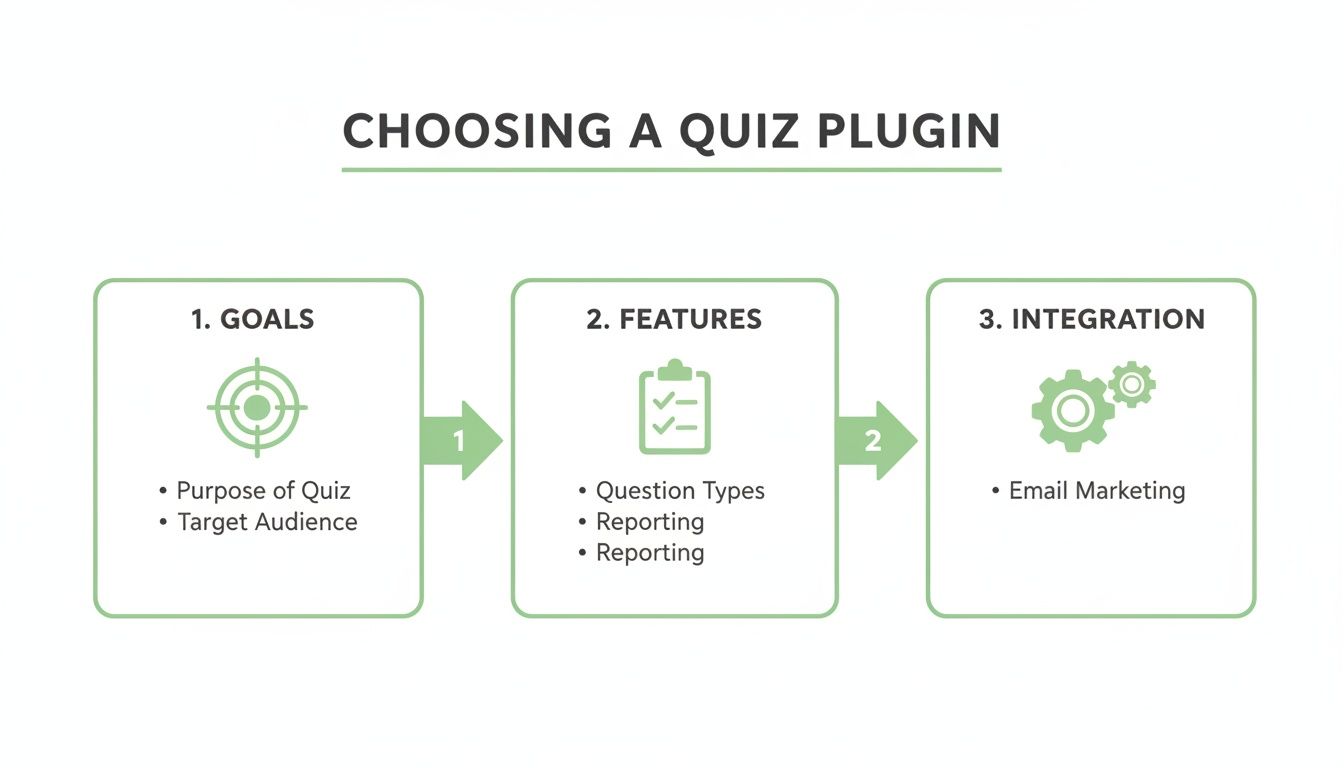 This visual flow makes one thing clear: picking the right tool is a strategic decision, not just a technical one. It starts with knowing exactly what you want to achieve.
Mapping Quiz Types to the Buyer Journey
The type of quiz you build has to match where your audience is in their buying process. Different formats serve different purposes, and nailing this choice is critical for delivering value and gathering data that’s actually useful.
Personality Quiz (Top of Funnel): These are perfect for awareness and pure engagement. A title like "What's Your Leadership Style?" attracts a broad audience. The goal here is simple: capture attention and a top-level email address, not to qualify heavily.
Assessment Quiz (Middle of Funnel): This quiz type helps prospects diagnose a problem. For instance, a "Marketing Maturity Assessment" helps a user see the gaps in their own strategy. This gathers deeper, more valuable data and segments leads based on their needs and sophistication.
Calculator Quiz (Bottom of Funnel): Calculators provide a concrete, quantifiable outcome, making them powerful decision-making tools. A "Calculate Your Potential ROI with Our Software" quiz is ideal for prospects who are already solution-aware and just comparing their options.
Remember, your quiz funnel is just one part of a much larger strategy. To make sure it's pulling its weight, you need to understand the bigger picture of website performance. For a broader view, check out these proven strategies to improve website conversion rate. This holistic approach ensures your quiz actually contributes to your main business goals.
Crafting Questions That Gather Actionable Data
Your questions are the heart of the funnel. Each one needs to do two jobs at once: keep the user engaged while secretly gathering segmentation data for your CRM. Keep your questions conversational, clear, and focused on one idea at a time.
A brilliant way to do this is with branching logic, also known as conditional logic. This feature, found in most premium plugin wordpress quiz tools, shows the next question based on the user's previous answer. This creates a hyper-personalised path that feels more like a one-on-one conversation, which is absolutely key to keeping completion rates high.
Here’s how that plays out: Imagine a SaaS company that sells project management software. Their quiz, "What's Your Team's Productivity Score?", could use branching logic like this:
- Question: "How large is your team?" (Answers: 1-5, 6-20, 21+)
- Logic: If the user selects "21+", the next question might dive into cross-departmental collaboration challenges. If they pick "1-5", the next question could focus on individual task management.
This simple tweak makes the entire experience far more relevant for the user and delivers much cleaner data to your sales team.
The Art of the Lead Capture Form
The move from the last question to the lead capture form is the most critical moment in your entire funnel. It has to feel like a natural and fair exchange of value. Forget a generic "Enter your email." Frame it as the key to unlocking their personalised results.
Key Takeaway: Position your lead gate not as a barrier, but as the final step to receiving the personalised insight they've invested their time in. A message like, "Enter your email to see your detailed Productivity Score and get a custom action plan" has a much higher conversion rate.
This works because the user has already built momentum. They're psychologically committed to seeing the outcome. This pattern of engagement is exactly why quizzes are such an effective tool. Technologies like WP Quiz, which is on over 60 million websites, have normalised this interaction. It helps explain why a well-designed quiz funnel can hit 40–55% conversion rates.
Ultimately, a quiz that converts is a masterclass in empathy. It understands the user's motivations, anticipates their needs, and delivers a personalised solution that makes sharing their contact information feel like a no-brainer.
100% Free Lead Magnet Audit
Our AI analyzes your website and delivers custom growth strategies in seconds.
Getting Your Quiz Up and Running
Alright, you've picked your weapon of choice—your WordPress quiz plugin. Now it's time to get it wired up and working on your site. This is where your marketing strategy gets its hands dirty with a little bit of tech.
Don't worry, it's not as scary as it sounds. While every plugin looks a bit different on the surface, the core steps for getting set up are pretty much the same across the board.
The installation itself is dead simple. It's just like adding any other WordPress plugin. Head to Plugins > Add New, search for the one you chose, and hit "Install," then "Activate." If you bought a premium plugin directly, you'll just upload the .zip file in that same spot. Easy.
First Things First: The Core Settings
Once the plugin is live, you'll see a new item pop up in your WordPress dashboard. Before you even dream of writing your first question, click on it and find the general settings panel. This is your command centre.
Taking ten minutes here will save you hours of headaches down the road. Seriously.
- Hook Up Your Email Platform: This is the whole point, right? Find the "Integrations" or "API" tab. This is where you’ll connect your email marketing service like Mailchimp or ConvertKit. You’ll usually just need to paste in an API key. This is what makes sure your new leads automatically flow into the right email list or nurture sequence.
- Handle Your Privacy and Consent: Don't skip this. To stay on the right side of data privacy laws, you need to get clear consent. Good plugins have a simple checkbox for this. Turn it on, and make sure you link it directly to your site’s privacy policy page.
- Set Your Global Styles: Get your branding right from the start. You can usually set default colours, fonts, and button styles that will apply to every quiz you make. This keeps everything looking consistent and professional without you having to tweak every single quiz you create.
Nail the initial setup. A solid foundation here turns your quiz from a simple gimmick into an automated marketing machine that works for you 24/7.
Building Your First Quiz
With the technical groundwork laid, now for the fun part: building the quiz itself. Most modern plugins use a visual, drag-and-drop builder, so you don't need to be a developer to make something that looks great and works flawlessly.
Let’s walk through a real-world example. Imagine we're creating a "What's Your Marketing Style?" quiz to segment our audience.
The real magic isn't in the questions—it's in the scoring logic. For a personality-style quiz, there are no "right" or "wrong" answers. Instead, each answer nudges the user toward a specific outcome.
Example: "Marketing Style" Quiz Logic
- Define Your Outcomes: First, you map out the possible results. For our quiz, we'll use: "The Data Scientist," "The Creative Storyteller," and "The Community Builder."
- Assign Points to Answers: Now, as you write each question, you link the answers to your outcomes. For a question like, "When launching a new campaign, what's your first move?" the answers could be:
- "Dig into the historical performance data." (+1 point to The Data Scientist)
- "Brainstorm a killer brand story." (+1 point to The Creative Storyteller)
- "See what our audience is talking about on social." (+1 point to The Community Builder)
- Build Out the Results Pages: The plugin handles the math, automatically tallying the points. Whichever outcome gets the highest score is the result the user sees. Your job is to create a valuable results page for each outcome, complete with a personalised description and a highly relevant call-to-action.
This logic is the engine of your lead magnet. It's what turns a simple Q&A into a powerful segmentation tool that gives users a personalised payoff and feeds you clean, organised data.
If you're ever questioning if your quiz is actually effective, an unoptimised lead magnet can do more harm than good. You can get a free, detailed analysis and AI-powered ideas for improvement with the Magnethive audit tool.
Finally, you need to get the quiz onto your website. The plugin will generate a shortcode—a tiny piece of text that looks something like [quiz id="1"]. Just copy that snippet, paste it into the editor on any WordPress page or post, and hit publish.
Just like that, your interactive lead-gen tool is live and ready to go to work.
Wiring Your Quiz Into Your Marketing and Sales Machine

So, you've captured a lead with your quiz. Great. But that's just the starting whistle, not the finish line.
The real magic happens when your plugin wordpress quiz stops being a standalone gadget and becomes the central nervous system of your marketing funnel. It should be feeding intelligent data directly into your workflow, making everything smarter.
This is how you turn a simple contact form into a strategic diagnostic tool. It’s about building an automated system where a quiz taker’s answers instantly trigger a personalised, relevant follow-up. You’re connecting them to the right message at the perfect time.
Automating Lead Sync and Segmentation
First things first: you absolutely have to connect your quiz plugin directly to your CRM or email platform. Forget manually exporting and importing CSV files. That’s a slow, error-prone nightmare that kills all your momentum. A native, API-based integration is non-negotiable.
This direct connection does two critical things:
- Instant Data Transfer: The moment a lead hits submit, a new contact record pops up in your system, whether it’s HubSpot, ActiveCampaign, or Mailchimp. No delay.
- Dynamic Tagging: This is the game-changer. You can set up your quiz to automatically apply specific tags to a lead based on their answers or their final score.
Picture a business coaching quiz. It could tag leads with things like "Struggling with Sales," "Needs Operations Help," or "Growth-Ready." This segmentation happens on autopilot, creating clean, actionable lists without you lifting a finger. If you want to go deeper on this, check out our guide on integrating marketing automation and CRM systems.
Triggering Personalised Nurture Sequences
Once your leads are neatly tagged in your CRM, you can unleash the full power of marketing automation. No more sending every new lead the same boring "welcome" email. Instead, you can drop them into hyper-specific nurture sequences that speak directly to the problems they just told you they have.
A quiz isn't just about grabbing an email; it's about earning the right to have a relevant conversation. The data you collect is a roadmap for exactly what that conversation should be.
Imagine the lead tagged "Struggling with Sales." They could immediately get a three-part email series packed with your best content on closing deals. Meanwhile, the "Needs Operations Help" lead gets a completely different sequence about building efficient systems. This is the kind of personalisation that turns cold leads into warm, engaged prospects.
Tracking Performance and Proving ROI
To justify building a quiz funnel, you have to measure its impact. This means going way beyond just counting leads. You need to track the entire user journey, and for that, integrating with an analytics tool like Google Analytics 4 (GA4) is essential.
Most good quiz plugins can fire custom events at key moments in the quiz. You’ll want to track:
- Quiz Started: This tells you how well your headline and call-to-action are working.
- Quiz Completed: This shows if your questions are engaging enough to keep people clicking.
- Lead Form Submitted: This is your main conversion metric. It's the bottom line.
By tracking these events, you can build a funnel visualisation right inside GA4, showing you exactly where people are dropping off. This data gives you the hard evidence you need to tweak and optimise your quiz, proving its value as a reliable lead generation engine.
Globally, WordPress powers around 43% of all websites, which is a massive advantage for marketers. A business can slap a quiz on its existing site and potentially convert 40–55% of that traffic into leads without any complex site migrations. You can read more about the dominance of WordPress and what it means for you.
Got Questions About WordPress Quiz Plugins?
Good. You should. Building a high-converting quiz isn't just about slapping some questions together. Diving into the world of quiz plugins brings up a lot of questions, and getting the right answers is what separates a dead-end funnel from a lead-gen machine.
Here are the most common ones.
Quiz vs. Survey: What's the Real Difference?
It's easy to mix these two up, but they're built for completely different jobs. Thinking they're the same is a recipe for a failed campaign.
A survey plugin is a research tool. It's all about extracting information from your audience for your own analysis. It’s a one-way street: you ask, they answer, you get data.
A quiz plugin, on the other hand, is a value exchange. It’s built for engagement. You're giving the user an immediate, personalised result—a moment of self-discovery—in return for their attention and, ultimately, their email address. Scoring, branching logic, and custom results pages are what turn a simple form into an active lead magnet.
How Do I Keep My Quiz GDPR Compliant?
This isn't optional. Getting data privacy wrong can mean fines and a total loss of trust with your audience.
First off, pick a plugin that has built-in consent management features. Most of the serious players do.
The absolute must-have is an explicit, unchecked consent checkbox right on your lead capture form. Don't pre-check it. It needs to clearly state what they're signing up for (e.g., "Join our newsletter for marketing tips") and link directly to your privacy policy. You also need a clear process for handling data requests if someone asks to see or delete their information.
Look, a quiz is an incredible way to gather zero-party data. But that data comes with responsibility. Getting consent right isn't just about legal cover; it's about starting the relationship with your new lead on the right foot—with transparency and trust.
What Metrics Actually Matter for My Quiz Funnel?
Just tracking the final number of leads is a rookie mistake. You'll know if it's working, but you'll have no idea why. To really understand performance, you need to watch the entire funnel.
Focus on these four numbers to get the full story:
- Start Rate: What percentage of people who see the quiz actually click to start it? If this number is low, your headline or call-to-action is probably boring or unclear.
- Completion Rate: Of those who start, how many make it all the way to the end? A big drop-off here is a massive red flag. It usually means your questions are too long, confusing, or just plain irrelevant.
- Lead Conversion Rate: This is the big one for lead gen. What percentage of people who finish the quiz actually give you their email to see the results? This tells you how compelling your offer is.
- Lead-to-Customer Rate: The ultimate test. How many of the leads generated by this quiz eventually buy something? This metric shows you the actual ROI and tells you if you're attracting the right kind of people.
Can I Get Away With a Free Quiz Plugin?
I get it, free is tempting. But for serious lead generation? It’s almost always a trap.
Free tools like HD Quiz are fine for a bit of fun—a simple "What character are you?" quiz to boost engagement on a blog post. They're toys, not tools for building a marketing funnel.
If you're a business focused on turning traffic into qualified, segmented leads, you have to invest in a paid plugin. The features that actually drive ROI are always locked behind a paywall.
We're talking about the essentials:
- Real CRM Integrations: You need to automatically send lead data and their quiz answers to your marketing hub like ActiveCampaign or HubSpot. Manual exports don't scale.
- Smart Conditional Logic: This is what makes a quiz feel like a personalised conversation instead of a clunky form. It's non-negotiable for segmentation.
- Proper Analytics: You need to see exactly where people are dropping off in your funnel so you can fix the leaks.
Without these, your quiz is just a piece of content. With them, it becomes an automated marketing asset that works for you 24/7.